A running total of an employee's year to date figures for the current tax year can be found in the 'Opening Balances' setting under the 'Employee Settings' on the Employee Details page.
The figures will update every time you finalise a pay run.
The year to date figures can be accessed by clicking on the 'Year to date' tab and to access a breakdown for each of the options you need to click on the arrow to the left of each option.
Gross Pay
The first figure will be the current 'Gross Pay' for the employee for this tax year. This figure will then be broken down into the different pay categories and deductions that contribute towards this figure.
You will be able to see the actual current 'Taxable Pay' for the employee and you will also be able to see if the pay categories or deductions are National Insurance payable and/or Taxable or not.
Statutory Pay
The first figure will be the current 'Statutory Pay' for the employee for this tax year. This figure will then be broken down into the different versions of statutory pay that contribute towards this figure.
Tax
Just the one option here which will show you how much tax the employee has currently paid for this tax year.
National Insurance
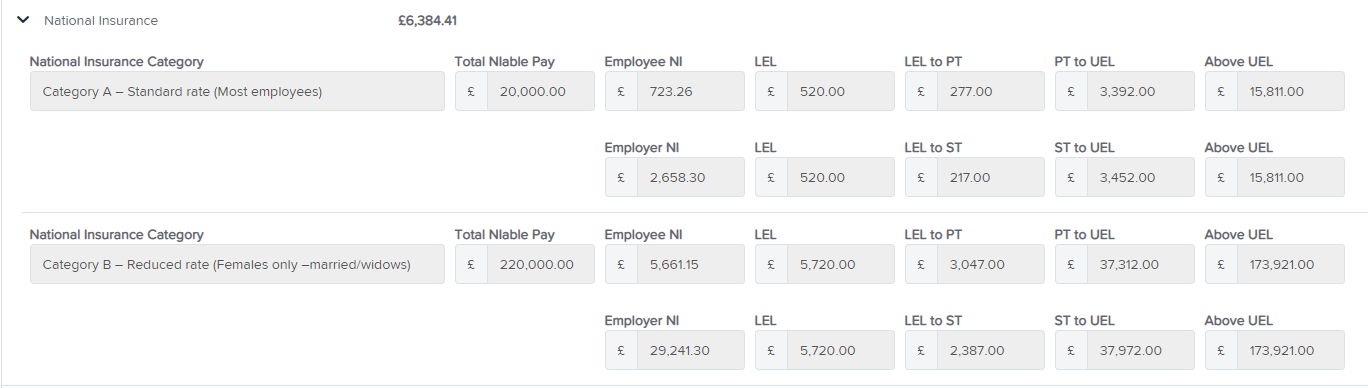
The first figure will be the current 'National Insurance contribution' for the employee for this tax year.
The National Insurance option will then be broken down to show the 'Total NIable Pay' and then what the current Employee NI contribution is and what the current Employer NI contribution is.
The figures for the relevant National Insurance thresholds will also be shown.
In the example used above you will notice that the employee changed National Insurance Category during the current tax year, if this is the case you will see that the figures will be broken down for each category.
Pensions
The first figure will be the total of the current 'Pensions contribution' from both the employee and employer for this tax year.
There will then be a breakdown to show the 'Pensionable Pay' used to calculate this figure and then a breakdown of the employee's contribution and then the employer's contribution.
Deductions
The first figure will be the current 'Deductions' made by the employee for this tax year.
The figure will then be broken down to show the current total for each deduction made by the employee.
Net Pay
The first figure will be the current 'Net Pay' for the employee for this tax year.
The figure will then be broken down by the amount earned by the employee in each pay run.
You can then be taken directly to the pay slip for each pay run by clicking on the blue text above each figure.
When you then finalise the first pay run in the new tax year the figures will reset for the employee to show the first earnings in the new tax year for W1, F1 or M1 depending on which pay schedule is being used.
N.B. Please note if you are moving employees from a different system to this system during the tax year and entering opening balances for them, you need to ensure you enter the NI threshold figures.
If the opening balance figures are not populated, when you finalise the first pay run for these employees the National Insurance option will pull through the Total NIable Pay, Employee Contribution and Employer Contribution from the Opening Balances (as populated in the screenshot above) but will only include the thresholds from the pay runs finalised.
N.B. Also if you add a new employee during the tax year and include the figures from their P45 from their previous employment in the employee Tax and NI Details screen.
When you finalise the first pay run on this system these figures will only be reflected under 'Taxable Pay' in the 'Gross Pay' option and in the 'Tax' option.